


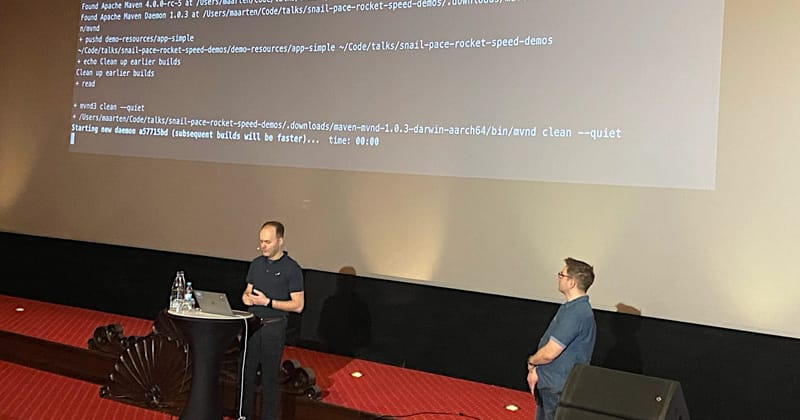
JavaLand 2026 closed yesterday, and Maarten Mulders and I had a blast presenting our talk »Accelerating Maven Builds«. We shared practical tips and tricks how to measure and speed up your Maven builds. From the questions from the audience we concluded that there’s a lot of interest in this topic.
This recap focuses on Maven performance, mvnd, Maven Cache Extension, and multi-module builds you can try right away and answers to some of the most asked questions from the audience.
Modifications to our talk
Since JavaLand 2026 gave us a short slot of only 40 minutes, we shortened our talk a bit. We removed the slides containing some definitions, removed duplicated conclusions and live on stage I skipped over JUnit 4 / TestNG, as no one in the audience used them.
Three tips to speed up your Maven builds right away
Using Apache mvnd instead of mvn
Try out mvnd (Maven Daemon), which is a drop-in replacement for mvn. It keeps a JVM »warm« in the background and parts of the classes (plugins) in memory.
If you see warnings about non-threadsafe plugins, check for updates first. In case there are no updates available to the particular plugins, you might want to open an issue with the plugin maintainers, as they should be thread-safe to work with mvnd or mvn -T1C.
If everything else fails, you can try to ignore the warnings — if it works, it works. It is just a flag to be set by the plugin maintainer. The other possibility is to switch to another, similar plugin, if available.
If you want to dig in further, please look at my article Feed the Daemon: Faster Builds with Maven Reactor Modules.
Creating a new Apache Maven Module/Subproject for new functionality
This is »feeding the Maven Daemon«: If you add a new Service to your application, put it into a new module. This way, you give »food« to the Maven Daemon as the project dependencies become less and less linear. The sequential build can be broken down into parallel module builds the more modules the project has.
Trying out the Apache Maven Build Cache Extension
The Apache Maven Build Cache Extension is a fairly new extension that allows you to cache build artefacts and dependencies.
Imagine you have a multi-module project with 5 sequential modules, and you change something in module 5. Why would you want to rebuild everything from module 1 to 5, if you only need to rebuild module 5? The build cache extension allows you to cache the build artefacts of modules 1 to 4. With the additions of a remote cache, it even allows consuming a build cache which was created on another machine, e.g. in a CI environment or by a co-worker.
Please share the results of your experiments with the build cache extension on the Apache Maven User Mailing List.
Questions from the audience
As always, we had a lot of good questions from the audience. Here are some answers to the most asked questions (and those we find interesting).
Q: Why change the software architecture just for the sake of a faster build?
A: We don’t suggest to change the software architecture just for the sake of a faster build. You would want to do this not just for the sake of speed, but also for a better architecture of your application. But this really depends on your project and your team.
If you have a small application, tearing apart functionality into separate modules might not be worth the effort. It won’t affect build time much anyway.
However, if you have a large application, modularization can significantly improve build times and maintainability. By breaking down your application into smaller, more focused modules, you can avoid using classes that are not to be used in a specific service. Putting a single service into its own module also leads to »separation of concerns«, which is a good software design principle.
The side effect is the desired outcome: Multiple modules can be built in parallel.
Q: How much can the Apache Maven Build Cache Extension skip if a change was done to an intermediate module?
A: The answer to this question depends on the module graph.
Sequential Builds and Flat Dependency Graphs

In a sequential build (mvn or flat dependency graph): The Build Cache will skip the first e.g. two modules, then compile and test the changed module again and all the following modules that depend on it.
Complex Multi-Module Builds
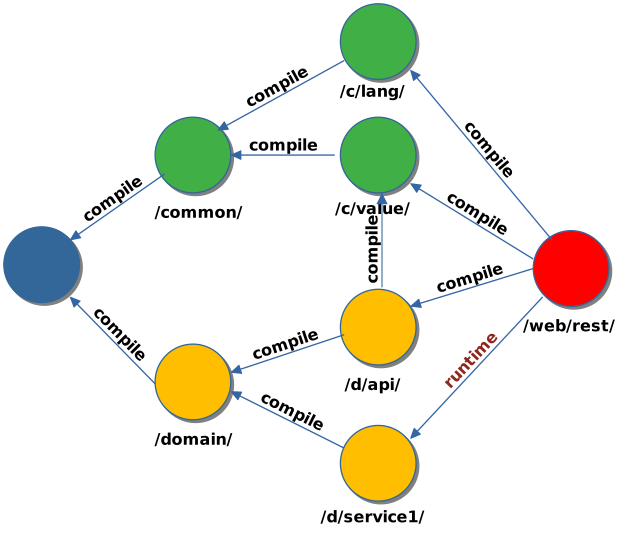
In the example above, take a special look at the dependency between /web/rest and /domain/service1. It is a runtime dependency. If you change anything in /domain/service1, the Build Cache will skip the build of all previous modules, including /domain/api and all /common modules, but will build the changed /domain/service1 and the /web/rest module, as it depends on the changed module.
However, if a module /domain/service2 exists and was not changed, this will be skipped, too.
Surprising findings from our talk
No more JUnit 4 or TestNG usage
We were positively surprised that no one in the audience used JUnit 4, TestNG or Spock any more. We expected that there would be some users of these testing frameworks, but it seems that everyone has already switched to JUnit Jupiter. Wow! Bravo!
Not everyone knows the Apache Maven Wrapper
If you cannot or do not want to use mvnd in your CI environment, surprisingly few people in the audience thought of using the Apache Maven Wrapper, or even did not even know it existed.
Especially in projects where you do not have control over the developer notebooks, a »blessed« build is important. For this, a defined version of Apache Maven can be soft-enforced by using the Apache Maven Wrapper. IDEs will recognize and suggest using the wrapper, and it will be used in CI environments as well if you configure your workflows to execute bash ./mvnw instead of mvn.
The advantage of this approach is that all developers and CI environments will use the same version of Apache Maven, which can help to avoid build issues caused by different Maven versions.
Not everyone knows the Apache maven-enforcer-plugin
Another thing which came up in follow-up questions was the maven-enforcer-plugin. If you never heard about it, I can highly recommend to check it out as well.
Basically, it runs in the very first phase of your build and checks for certain conditions, e.g. the version of Apache Maven, the Java version, or the presence (or absence) of certain dependencies.
Apache Maven Enforcer Built-In Rules
Some built-in rules of the maven-enforcer-plugin include:
requireMavenVersion: Enforces a specific version of Apache Maven to be used for the build.requireJavaVersion: Enforces a specific version of Java to be used for the buildbannedDependencies: Bans specific dependencies from being used in the project.
Mojohaus Extra Enforcer Rules for Apache Maven Enforcer Plugin
Some interesting Mojohaus Extra Enforcer Rules include:
banDuplicateClasses: Bans duplicate classes from being present in the project, which can help to avoid classpath issues.enforceBytecodeVersion: Enforces a specific bytecode version for the compiled classes, which can help to avoid compatibility issues.requireEncoding: Enforces a specific encoding to be used for the source files, which can help to avoid encoding issues.banCircularDependencies: Bans circular dependencies between modules, which can help to improve the modularity and maintainability of the project.
Further reading
That’s a wrap!
Try mvnd locally and compare one build before and after and let me know in the comments or on social media if your Build Performance improved.
Related articles
All articles from our »#SnailToRocket« series:
SnailToRocket a.k.a. #Snail2RocketParallel unit tests with Apache Maven:
Guide: Parallel unit tests with Apache MavenFeed the Daemon: Faster Builds with Maven Reactor Modules:
Feed the Daemon: Faster Builds with Maven Reactor Modules