


You can register and log in into many websites using your email address as login ID. But what happens if you cannot enter your valid email address into the form? The root cause of this often is that some developers did not read RFC 2822. Many web services do not allow email addresses which are valid, according to the specification.
I first ranted about this in 2013 — but still, as of today, too many sites still reject valid addresses. Regular expressions (regex) is often the culprit. I have even collected a small ‘gallery of shame’ of real-world examples — you will find it at the end of this article.
What makes an email address valid (RFC overview)
RFC 2822 is the standard that defines a valid email address. An email address consists of two parts:
- The local part
everything before the last
@sign- The domain
everything after the last
@sign.
Did you notice how I said after the last @-sign? Believe it or not: RFC 2822 allows surprisingly many special characters in the local part!
List of valid signs in the local part
This is a compiled list of allowed characters, as documented in RFC 2822 and noted in both the German and English Wikipedia articles:
| Character | Explanation |
|---|---|
| Exclamation point/mark |
| Apostrophe (straight) |
| Question mark |
| Equals symbol |
| curly braces |
| circumflex |
| dollar sign |
| Asterisk (»star«) |
| Percent sign |
| Ampersand (»and«) |
| masked space |
| Masked double quotation marks |
| Masked »at« sign |
| Masked commas |
10 rules for valid email addresses
Here is a list with requirements which makes an email address valid:
An email address consists of a local part and a domain, which is separated by an
@character.The local part consists of letters, numbers and the above-mentioned characters, including dots as a delimiter, but without a dot in the beginning, at the end, or two consecutive dots (RFC 2822 3.2.4).
The local part may be enclosed in quotation marks. This means all permitted characters – including spaces – are valid inside double quotation marks (RFC 2822 3.2.5).
Masked pairs, (for example:
\@) are valid components of the local part as well. They are a legacy component from RFC 822, carried over to RFC 2822.The local part has a maximum length of 64 characters (RFC 2821 4.5.3.1).
The domain consists of components which are separated by dots (RFC 1035 2.3.1).
Each domain part must start with an alphanumeric character, may contain hyphens in the middle, and must end with an alphanumeric character (RFC 1035 2.3.1).
A component within the domain part cannot exceed 63 characters (RFC 1035 2.3.1).
The whole length of the domain part cannot exceed 255 characters (RFC 2821 4.5.3.1).
The domain must be fully qualified and be resolvable against a DNS resource record of either type A, AAAA or MX (RFC 2821 3.6).
Why regex fails
Regular expressions are powerful, but when it comes to validating email addresses, they are the wrong tool.
The plural of regex is regrets.
JetBrains
That sums it up perfectly: regex-based validation inevitably fails in edge cases.
Failed attempt #1: Short regex for mails
/^[a-zA-Z0-9_.-]+@[a-zA-Z0-9-]+.[a-zA-Z0-9-.]+$/At first glance this looks fine:
It ensures there is something before and after the
@sign.It allows dots, dashes, and underscores.
It looks simple enough to trust.
But it already fails for common valid addresses:
john+test@example.com→ rejected because\+is not allowed in the local part."name with spaces"@example.com→ rejected because quotes are not handled..user.@.sub.domain.example.com→ fails because the dot handling is too permissive (.[a-zA-Z0-9-.]+will happily match..or a trailing dot).
In other words: this regex is too permissive in some places, and too restrictive in others.
Attempt #2: A variant from devshed
This was once a post on devshed: Validating email domains with checkdnsrr() - PHP:
function checkEmail($email) {
  if (
    preg_match(
      "/^([a-zA-Z0-9])+([a-zA-Z0-9\._-])*@([a-zA-Z0-9_-])+([a-zA-Z0-9\._-]+)+$/",
      $email
    )
  ) {
    list($username, $domain) = split('@', $email);

    if (!checkdnsrr($domain, 'MX')) {
      return false;
    }

    return true;
  }

  return false;
}
This was one of the next search results back in 2013, and it looked more complete. The main advantage was a slightly better regex to check the mail address. Plus, if it was deemed valid, it even checked for a valid MX record.
Because of this, it was recommended by many people back then and could be found on various blogs and developer resources.
However, there are still problems with this approach:
The Regex is still too restrictive
It will still fail on
john+test@example.com(+not allowed).It fails on quoted local parts like
"name with spaces"@example.com.Escaped characters like in
user\@name@example.comare still not considered valid.
DevShed’s Regex is still too permissive
This regex still allows consecutive dots in the domain (
example..com).It will let slip through a domain starting with a dot or dash (
-foo.comor.bar.com).It will also accept a trailing dot (
example.com.), which is invalid for mail addresses.
Outdated PHP function
split('@', $email)has been deprecated for years;explode('@', $email)is the correct approach.
DNS check isn’t foolproof
Some valid domains may only have an
Arecord (notMX), yet still accept mail.Relying only on
MXcan reject valid addresses.
So while this snippet tries harder than the »average short regex«, it still fails the real-world test: rejecting valid emails while allowing invalid ones.
What proper validation looks like
First, good validation uses the »divide and conquer«-algorithm. We already know that there is a local part and a domain part. This is also helpful for maintainability.
We can skip the quoted local part – this is what many parsers do because it is so uncommon.
If we do check DNS records, we should check not only for MX, but also for A (IPv4) and AAAA (IPv6) records.
Linux Journal’s approach in 2007
Even old validators did exist in 2013, which were better than the average checker. Let’s look at the check from Linux Journal in 2007. It is still online, as of 2025!
<?php

class MailChecker {
    public static function isValid($email) {
        $mail_errors = 0;
        $atIndex = strrpos($email, "@");

        if (is_bool($atIndex) && !$atIndex) {
            // no "@"? Return false immediately.
            return false;
        }

	    $domain = substr($email, $atIndex + 1);
	    $local = substr($email, 0, $atIndex);

	    // 1.) Check local part for common errors
	    $mail_errors |= MailChecker::mail_check_local($local);
	    // 2.) Check domain for common errors
	    $mail_errors |= MailChecker::mail_check_domain($domain);
	    // 3.) Check local part for quotation errors
	    $mail_errors |= MailChecker::mail_check_quoted($local);

        // 4.) Check, if domain exists.
	    if ($mail_errors == 0) {
            $mail_errors |= MailChecker::mail_check_dns($domain);
        }

	    return $mail_errors;
    }

    private static function mail_check_local($local) {
        $local_errors = 0;
        $localLen = strlen($local);

        if ($localLen < 1 || $localLen > 64) {
            // local part length exceeded
            $local_errors |= 1;
        } else if ($local[0] == '.' || $local[$localLen - 1] == '.') {
            // local part starts or ends with '.'
            $local_errors |= 2;
        } else if (strpos($local, '..')) {
            // local part has two consecutive dots
            $local_errors |= 4;
        }

	    return $local_errors;
    }

    private static function mail_check_domain($domain) {
        $domain_errors = 0;
        $domainLen = strlen($domain);

        if ($domainLen < 1 || $domainLen > 255) {
            // domain part length exceeded
            $domain_errors |= 8;
        } else if (!preg_match('/^[A-Za-z0-9\\-\\.]+$/', $domain)) {
            // character not valid in domain part
            $domain_errors |= 16;
        } else if (strpos($domain, '..')) {
            // domain part has two consecutive dots
            $domain_errors |= 32;
        } else if (!strpos($domain, '.')) {
            // there is no dot at all?
            $domain_errors |= 64;
        }

	    return $domain_errors;
    }

    private static function mail_check_quoted($local) {
        $quoted_errors = 0;

        if (!preg_match('/^(\\\\.|[A-Za-z0-9!#%&`_=\\/$\'*+?^{}|~.-])+$/', str_replace("\\\\", "", $local))) {
            // character not valid in local part unless
            // local part is quoted
            if (!preg_match('/^"(\\\\"|[^"])+"$/', str_replace("\\\\", "", $local))) {
                $quoted_errors |= 128;
            }
        }

        return $quoted_errors;
    }

    /*
     * Validate an email address.
     * Provide an email address by raw input.
     * Returns 0 (true) if email address has an
     * RFC 2822 / 2821 / 822 conform format
     * and the domain does exist with
     * either A, AAAA or MX records.
     */

    private static function mail_check_dns($domain) {
        $domain_errors = 0;

        if (!(checkdnsrr($domain, "MX") || checkdnsrr($domain, "A") || checkdnsrr($domain, "AAAA"))) {
            // domain not found in DNS
            $domain_errors |= 256;
        }

        return $domain_errors;
    }
}
It checks:
Lengths of both local domain and local part
leading, trailing and consecutive dots
At least one dot for the domain part.
Quoting in local part – this is much better than what most parsers did in 2007, even in 2013. Even as of today, many parsers ignore this entirely.
However, this still comes with weaknesses:
Some characters are still not being checked properly, e.g. escaped
!or?(mostly for security reasons).user%example.com@example.orgwill still not be recognized as a valid email addressThe domain part could end with a dash
-, but this is not recognized as invalid (maybe in the DNS check).strpos()is an old function, and the return code is not checked.It will fail on international domain names (IDN), which was not a thing back in 2007.
Implementing a correct parser
This is something for another day. I hope you still learned something about email address parsing.
Conclusion
Regex and email addresses don’t mix. You’ll always either reject valid users or let invalid junk through. The better approach: break down the address, check only what matters to your use case, and test against reality. If you want to keep your users happy, at least allow + addressing. Regex can be useful in many places – but for emails, it’s the wrong tool for the job.
When Regex Goes Wrong: Real-World Examples
A.k.a.: Hall of Fame (for broken validators)
Examples from 2013
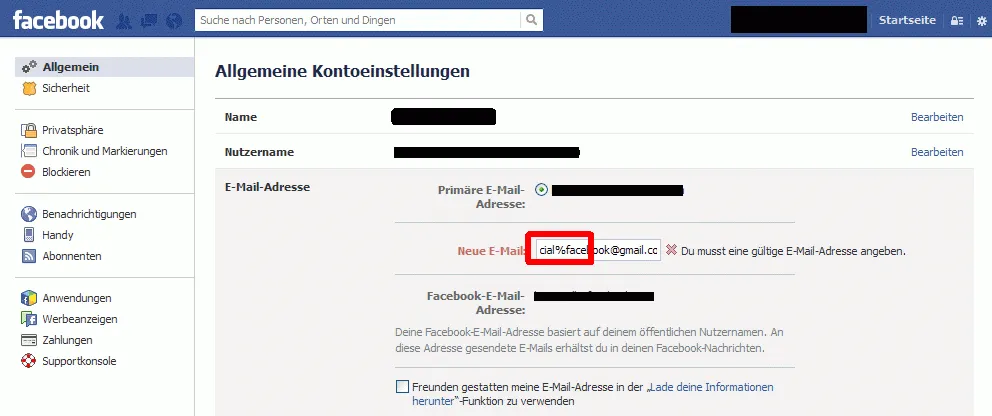
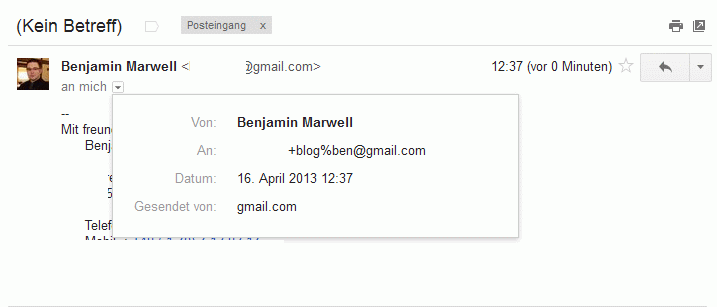
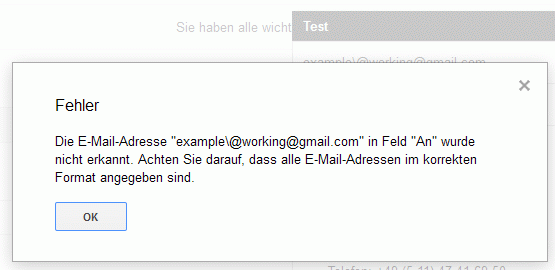
@ symbols either.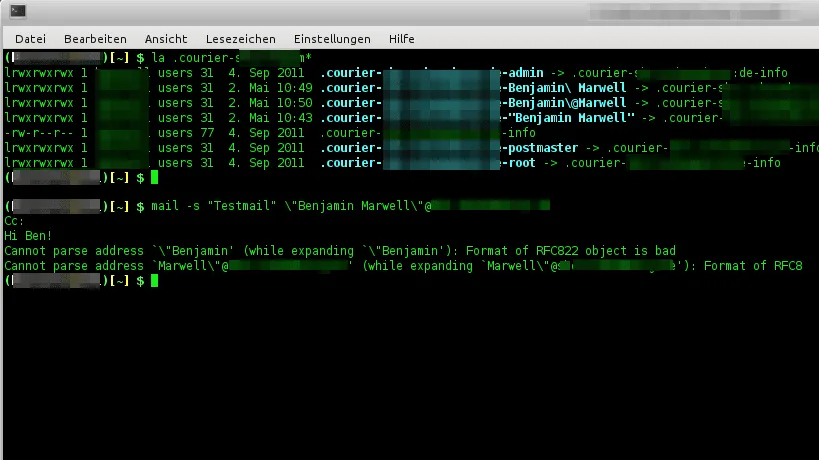
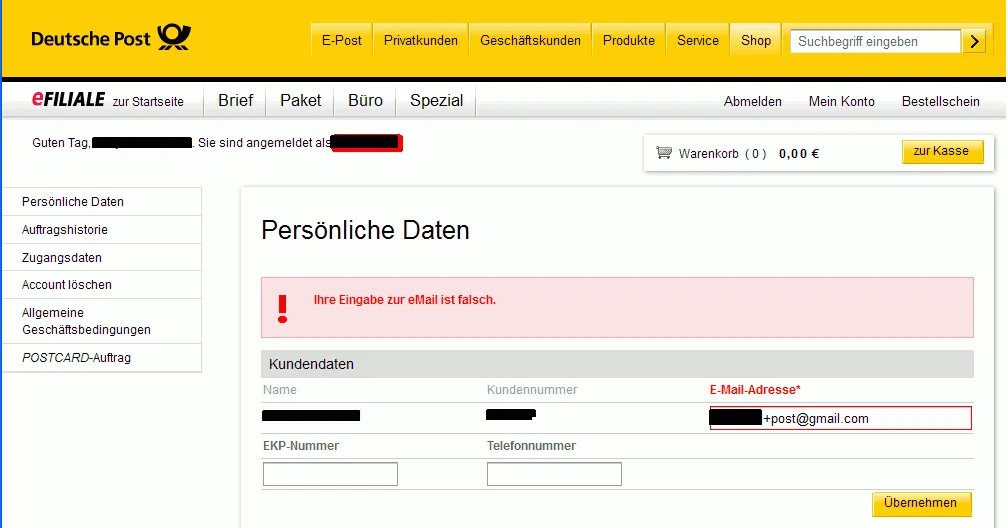
+post back then, but now they do!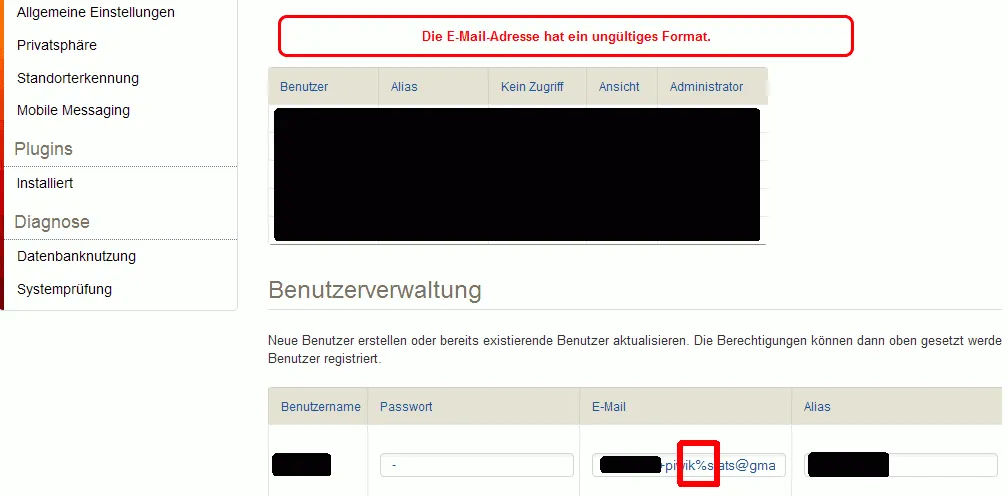
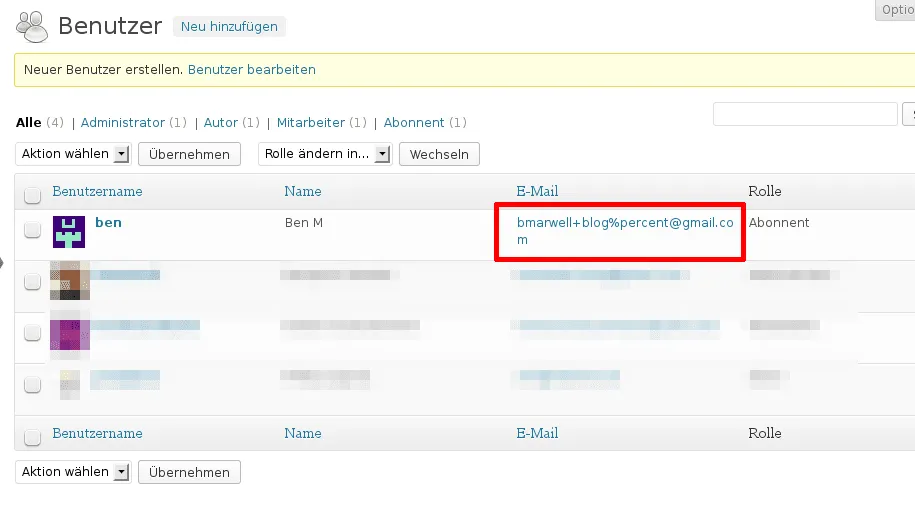
+ and %.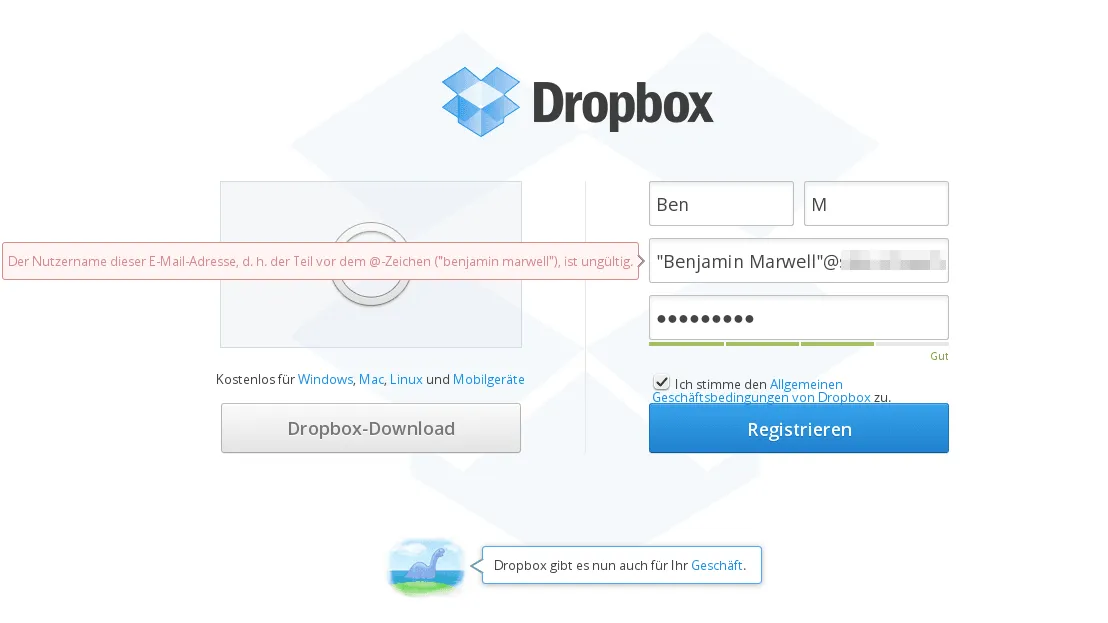
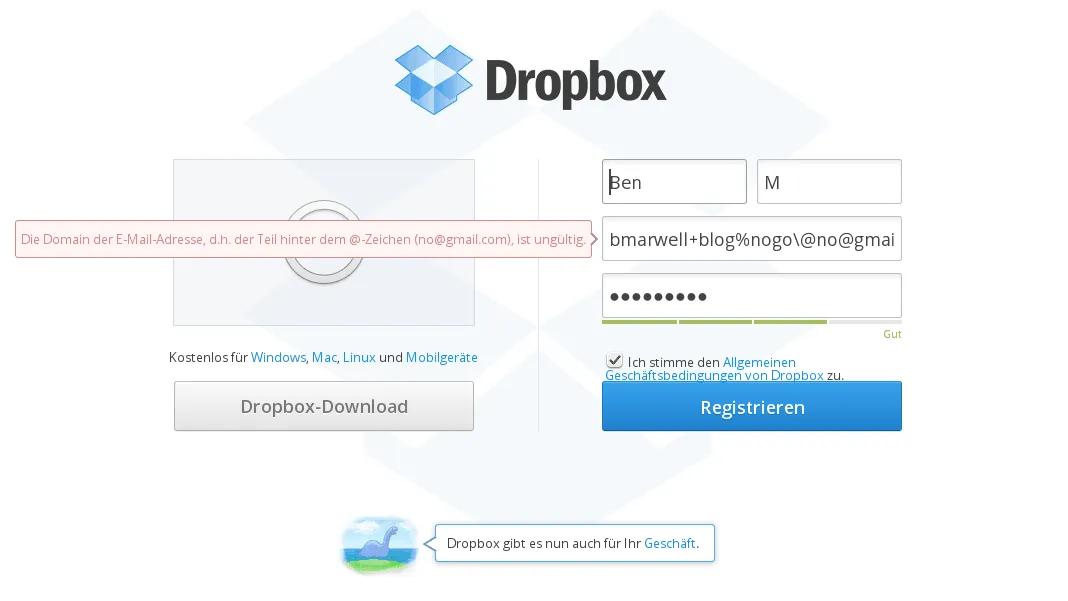
@ signs either.Recent examples (2024/2025)
… please add your own findings in the comments below!